新觅源码分享开源软件分享 · XinMiCode

登录|注册

消息开通会员
新觅源码分享

开源软件分享,只收取会员费

关于我们用户协议隐私政策会员协议开源许可开通会员全部标签

Gitea微信公众号 · 新觅

© 2026 新觅源码分享. 保留所有权利。

客服反馈

AI 选型助手

描述你的需求,我来帮你选型

说说行业与场景,我会从目录里最多推荐 3 个项目。

Enter 发送 · 游客 20 次/时

首页AI工具开源项目技术教程会员专区我的领取
  1. 首页
  2. ›正文

本页导航

  • 项目介绍
  • 仓库预览
  • 交付方式
  • 用户评论

内容大纲

  • Getting Started
  • Operating System Compatibility
  • Prerequisites
  • Basic Installation
  • Manual Inspection

ohmyzsh

觅心米1小时前更新000
登录查看交付
ohmyzsh
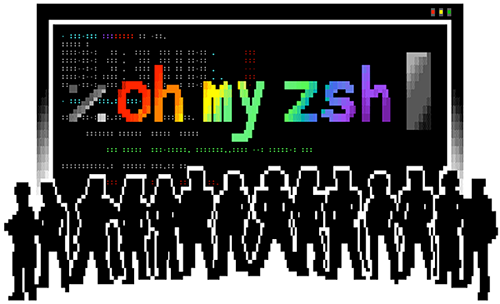
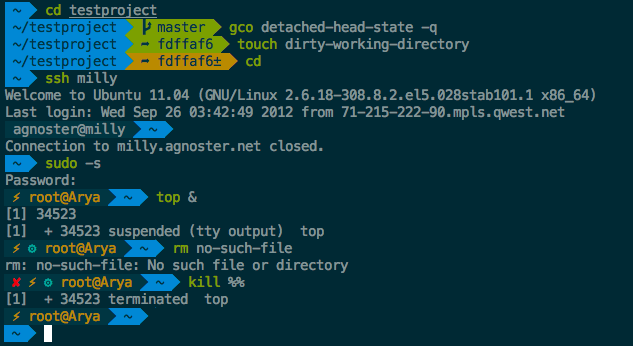
ohmyzsh 截图 1ohmyzsh 截图 2ohmyzsh 截图 3ohmyzsh 截图 4ohmyzsh 截图 5ohmyzsh 截图 6
AI 摘要

🙃 A delightful community-driven (with 2,500+ contributors) framework for managing your zsh configuration. Includes 300+ optional plugins (rails, git, macOS, hub, docker, homebrew, node, php, python,…

项目简介

<p align="center"><img src="https://bt-1408553325.cos.ap-guangzhou.myqcloud.com/uploads/gitea/d8/d856d058620bee16f366f231c5041b02ece50b56ffd78f4a9b1b532c91806393.png" alt="Oh My Zsh"></p>

Oh My Zsh is an open source, community-driven framework for managing your zsh configuration.

Sounds boring. Let's try again.

Oh My Zsh will not make you a 10x developer...but you may feel like one.

Once installed, your terminal shell will become the talk of the town or your money back! With each keystroke in your command prompt, you'll take advantage of the hundreds of powerful plugins and beautiful themes. Strangers will come up to you in cafés and ask you, "that is amazing! are you some sort of genius?"

Finally, you'll begin to get the sort of attention that you have always felt you deserved. ...or maybe you'll use the time that you're saving to start flossing more often. 😬

To learn more, visit ohmyz.sh, follow @ohmyzsh on X (formerly Twitter), and join us on Discord.

CI OpenSSF Best Practices X (formerly Twitter) Follow Mastodon Follow Discord server

<a href="https://commitgoods.com/collections/oh-my-zsh?utm_source=github"> <picture> <source media="(prefers-color-scheme: dark)" srcset="https://cdn.shopify.com/s/files/1/0101/8752/files/commitgoods-badge-stacked-navy-dark.svg"> <img src="https://cdn.shopify.com/s/files/1/0101/8752/files/commitgoods-badge-stacked-navy.svg" height="28" alt="Official merch on commitgoods.com"> </picture> </a> <details> <summary>Table of Contents</summary> </details>
源码

觉得不错?点个赞吧!

0

仓库预览

pelmanmoe80-dev/ohmyzsh·master

只读预览

正在加载目录…

商品简介
<p align="center"><img src="https://bt-1408553325.cos.ap-guangzhou.myqcloud.com/uploads/gitea/d8/d856d058620bee16f366f231c5041b02ece50b56ffd78f4a9b1b532c91806393.png" alt="Oh My Zsh"></p>

Oh My Zsh is an open source, community-driven framework for managing your zsh configuration.

Sounds boring. Let's try again.

Oh My Zsh will not make you a 10x developer...but you may feel like one.

Once installed, your terminal shell will become the talk of the town or your money back! With each keystroke in your command prompt, you'll take advantage of the hundreds of powerful plugins and beautiful themes. Strangers will come up to you in cafés and ask you, "that is amazing! are you some sort of genius?"

Finally, you'll begin to get the sort of attention that you have always felt you deserved. ...or maybe you'll use the time that you're saving to start flossing more often. 😬

To learn more, visit ohmyz.sh, follow @ohmyzsh on X (formerly Twitter), and join us on Discord.

CI OpenSSF Best Practices X (formerly Twitter) Follow Mastodon Follow Discord server

<a href="https://commitgoods.com/collections/oh-my-zsh?utm_source=github"> <picture> <source media="(prefers-color-scheme: dark)" srcset="https://cdn.shopify.com/s/files/1/0101/8752/files/commitgoods-badge-stacked-navy-dark.svg"> <img src="https://cdn.shopify.com/s/files/1/0101/8752/files/commitgoods-badge-stacked-navy.svg" height="28" alt="Official merch on commitgoods.com"> </picture> </a> <details> <summary>Table of Contents</summary>
  • Getting Started
    • Operating System Compatibility
    • Prerequisites
    • Basic Installation
      • Manual Inspection
  • Using Oh My Zsh
    • Plugins
      • Enabling Plugins
      • Using Plugins
    • Themes
      • Selecting A Theme
    • FAQ
  • Advanced Topics
    • Advanced Installation
      • Custom Directory
      • Unattended Install
      • Installing From A Forked Repository
      • Manual Installation
    • Installation Problems
    • Custom Plugins And Themes
    • Enable GNU ls In macOS And FreeBSD Systems
    • Skip Aliases
    • Async git prompt
  • Getting Updates
    • Updates Verbosity
    • Manual Updates
  • Uninstalling Oh My Zsh
  • How Do I Contribute To Oh My Zsh?
    • Do Not Send Us Themes
  • Contributors
  • Follow Us
  • Merchandise
  • License
  • About Planet Argon
</details>

Getting Started

Operating System Compatibility

O/SStatus
Android✅
FreeBSD✅
LCARS🛸
Linux✅
macOS✅
OS/2 Warp❌
Windows (WSL2)✅

Prerequisites

  • Zsh should be installed (v4.3.9 or more recent is fine but we prefer 5.0.8 and newer). If not pre-installed (run zsh --version to confirm), check the following wiki instructions here: Installing ZSH
  • curl or wget should be installed
  • git should be installed (recommended v2.4.11 or higher)

Basic Installation

Oh My Zsh is installed by running one of the following commands in your terminal. You can install this via the command-line with either curl, wget or another similar tool.

MethodCommand
curlsh -c "$(curl -fsSL https://raw.githubusercontent.com/ohmyzsh/ohmyzsh/master/tools/install.sh)"
wgetsh -c "$(wget -O- https://raw.githubusercontent.com/ohmyzsh/ohmyzsh/master/tools/install.sh)"
fetchsh -c "$(fetch -o - https://raw.githubusercontent.com/ohmyzsh/ohmyzsh/master/tools/install.sh)"

Alternatively, the installer is also mirrored outside GitHub. Using this URL instead may be required if you're in a country like China or India (for certain ISPs), that blocks raw.githubusercontent.com:

MethodCommand
curlsh -c "$(curl -fsSL https://install.ohmyz.sh/)"
wgetsh -c "$(wget -O- https://install.ohmyz.sh/)"
fetchsh -c "$(fetch -o - https://install.ohmyz.sh/)"

Note that any previous .zshrc will be renamed to .zshrc.pre-oh-my-zsh. After installation, you can move the configuration you want to preserve into the new .zshrc.

Manual Inspection

It's a good idea to inspect the install script from projects you don't yet know. You can d

未领取也可只读浏览目录与文本文件。领取后获得夸克网盘永久分享(含提取码)。

交付方式

登录后即可查看 pelmanmoe80-dev/ohmyzsh 的夸克网盘永久分享(含提取码)。上方仓库预览无需登录也可浏览。

登录查看交付

评论0

登录 后才能发表评论。提交后需管理员审核才会公开。

还没有公开评论。登录后可以提交,审核通过后会出现在这里。

相关推荐

公开新上架

markitdown

Python tool for converting files and office documents to Markdown.

觅心米1小时前
公开领取00
ollama
公开新上架

ollama

Get up and running with Kimi, GLM, MiniMax, DeepSeek, gpt-oss, Qwen, Gemma and other models.

今日推荐

云睿资产管理系统
精选

云睿资产管理系统

会员可领

热门推荐

  1. 1
    云睿资产管理系统

    云睿资产管理系统

    面向数据中心运维的资产管理源码,覆盖机房机柜设备全生命周期,支持 3D 可视化、工单与盘点。

    会员可领

  2. 2

    Omarchy:漂亮、现代且固执己见的 Linux 发行版

    由 DHH 打造的漂亮、有趣且智能的 Linux 发行版,提供精心配置的桌面、开发工具与统一体验。

    公开领取

  3. 3
    skill

ohmyzsh

公开领取

登录查看交付
  • Getting Started
    • Operating System Compatibility
    • Prerequisites
    • Basic Installation
      • Manual Inspection
  • Using Oh My Zsh
    • Plugins
      • Enabling Plugins
      • Using Plugins
    • Themes
      • Selecting A Theme
    • FAQ
  • Advanced Topics
    • Advanced Installation
      • Custom Directory
      • Unattended Install
      • Installing From A Forked Repository
      • Manual Installation
    • Installation Problems
    • Custom Plugins And Themes
    • Enable GNU ls In macOS And FreeBSD Systems
    • Skip Aliases
    • Async git prompt
  • Getting Updates
    • Updates Verbosity
    • Manual Updates
  • Uninstalling Oh My Zsh
  • How Do I Contribute To Oh My Zsh?
    • Do Not Send Us Themes
  • Contributors
  • Follow Us
  • Merchandise
  • License
  • About Planet Argon

Getting Started

Operating System Compatibility

O/SStatus
Android✅
FreeBSD✅
LCARS🛸
Linux✅
macOS✅
OS/2 Warp❌
Windows (WSL2)✅

Prerequisites

  • Zsh should be installed (v4.3.9 or more recent is fine but we prefer 5.0.8 and newer). If not pre-installed (run zsh --version to confirm), check the following wiki instructions here: Installing ZSH
  • curl or wget should be installed
  • git should be installed (recommended v2.4.11 or higher)

Basic Installation

Oh My Zsh is installed by running one of the following commands in your terminal. You can install this via the command-line with either curl, wget or another similar tool.

MethodCommand
curlsh -c "$(curl -fsSL https://raw.githubusercontent.com/ohmyzsh/ohmyzsh/master/tools/install.sh)"
wgetsh -c "$(wget -O- https://raw.githubusercontent.com/ohmyzsh/ohmyzsh/master/tools/install.sh)"
fetchsh -c "$(fetch -o - https://raw.githubusercontent.com/ohmyzsh/ohmyzsh/master/tools/install.sh)"

Alternatively, the installer is also mirrored outside GitHub. Using this URL instead may be required if you're in a country like China or India (for certain ISPs), that blocks raw.githubusercontent.com:

MethodCommand
curlsh -c "$(curl -fsSL https://install.ohmyz.sh/)"
wgetsh -c "$(wget -O- https://install.ohmyz.sh/)"
fetchsh -c "$(fetch -o - https://install.ohmyz.sh/)"

Note that any previous .zshrc will be renamed to .zshrc.pre-oh-my-zsh. After installation, you can move the configuration you want to preserve into the new .zshrc.

Manual Inspection

It's a good idea to inspect the install script from projects you don't yet know. You can d
觅心米1小时前
公开领取00
printfilm
公开新上架

printfilm

PRINTFILM:AI 科普视频与漫剧创作平台

觅心米6小时前
公开领取10
公开新上架

FckSignups

A list of tools that are open-source, in-browser, and require no-signups!

觅心米1天前
公开领取20

skill

收录最全、更新最快的技能Skills商店:精选原创技能包(涵盖文档处理、内容创作、编程开发、机器学习、自动化工作流),全部打包好可直接安装使用!同时自动抓取GitHub上万个Skills项目,按分类、更新时间、Star数量整理。The most comprehensive and frequently updated AI Agent skill library, featuring curat…

公开领取

  • 4
    fmt:现代 C++ 高性能格式化库

    fmt:现代 C++ 高性能格式化库

    fmt 是一个开源 C++ 格式化库,提供快速、类型安全的字符串格式化,替代传统 printf 和 iostreams。支持 C++20 std::format 等现代特性,高性能且易于使用。

    公开领取

  • 5
    灵犀 Studio 多模型AI Agent管理控制台源码

    灵犀 Studio 多模型AI Agent管理控制台源码

    私有化部署的一体化AI工作台,支持多模型对话、渠道接入、用量分析、任务调度与运维管理,开箱即用。

    会员可领

  • 会员专属权益

    开通会员后,即可领取全部仅会员项目;公开项目登录就能领。

    立即开通会员 →

    标签云

    100天闭包财务系统操作系统大纲生成代码编辑器代码知识图谱调试对象多媒体工具多模型多模型支持多语言发行版高性能格式化全部 115

    社区公告

    • 09-08项目评论已开放,登录后提交,审核通过即展示。
    • 09-01微信公众号验证码登录可用,订阅号也能进站。
    • 08-22领取成功即可获得夸克网盘永久分享(含提取码)。